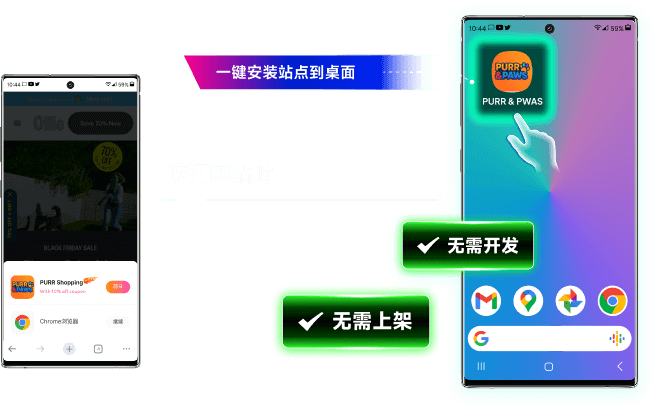
PWA Retargeting
Add to Homescreen
Turn your ad landing pages into installable apps that live on users' homescreens — unlocking repeat engagement with zero additional ad spend.
5–15% More Conversions
Users who install your PWA return more often and convert at higher rates than one-time visitors.
Zero Coding Required
DeepClick generates PWA install prompts for your existing pages automatically — no code changes needed.
No App Store Needed
Skip the app store review process. Your site becomes installable directly from the browser.
How PWA Install Works
DeepClick automatically adds install prompts to your landing pages, triggered at the optimal moment for each user.
- Installation templates for purchase/churn scenarios
- Smart trigger timing based on user behavior
- Customizable install prompt design
- Install analytics and conversion tracking

Frequently Asked Questions
What is PWA Retargeting?
PWA Retargeting adds 'Add to Homescreen' prompts to your ad landing pages. Once installed, your site appears on users' homescreens like a native app — a free, permanent re-engagement channel.
Do I need to build a native app?
No. DeepClick generates PWA install prompts for your existing pages with zero coding. No app store submission needed.
Which browsers support PWA install?
Chrome, Edge, Samsung Internet, and most Chromium-based browsers. Safari on iOS supports adding to homescreen via the share menu.
How does this help with ad conversion?
PWA-installed users have a direct icon on their homescreen. This creates repeat visits without additional ad spend, increasing lifetime value and conversion rates by 5-15%.
Turn Clicks into Installs
Give your ad traffic a reason to come back — without paying for another click.
Contact Sales